When I started today’s lesson, I thought storage was one of the simplest topics in cloud computing.
You save a file.
The cloud stores it.
End of story.
Or so I thought.
A few minutes into the lesson, I realized something interesting:
Not all data deserves the same storage.
And once I thought about it, it made perfect sense.
The Problem I Never Thought About
Imagine you own a huge library.
Some books are borrowed every day.
Some are only opened once a month.
Some haven’t been touched for years but must be preserved.
Would you keep every single book on the front shelf?
Probably not.
Yet that’s how I initially thought about cloud storage.
Store everything in one place and call it a day.
The reality is much more interesting.
Why Storage Strategy Matters
As companies grow, they collect enormous amounts of data.
Think about:
- Customer photos
- Videos
- Audio recordings
- Website backups
- Application logs
- Archived documents
Some of this information is used constantly.
Some is rarely touched.
And some is only kept because regulations require it.
The challenge isn’t just storing data.
The challenge is storing it in the right place at the right cost.
The Type of Data Traditional Databases Don’t Like
Earlier, I learned about databases, data warehouses, and data lakes.
Most of those systems work best when data has some structure.
But what about:
- Videos
- Images
- PDFs
- Audio recordings
These don’t fit neatly into rows and columns.
This type of information is called unstructured data.
And it’s growing faster than almost any other type of data.
Cloud Storage Thinks Differently
What surprised me was how Google Cloud stores this data.
Instead of thinking in terms of folders and file systems, Cloud Storage treats everything as an object.
Every object contains:
- The actual data
- Information about the data (metadata)
- A unique identifier
The easiest way I understood it was this:
Imagine every item in a library has its own permanent tracking number.
No matter where it’s stored, you can always find it.
That’s essentially how object storage works.
The Bookshelf Analogy That Made Everything Click
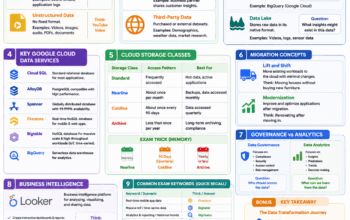
The most useful way I found to understand storage classes is by imagining different shelves in a library.
Not every book belongs on the same shelf.
Standard Storage 📚
This is your study desk.
The books you use every day stay here.
Examples:
- Website content
- Mobile app assets
- Frequently accessed business data
This is for “hot” data.
Data you use regularly.
Nearline Storage 📦
This is the shelf behind your chair.
You don’t need these books every day.
But you still reach for them occasionally.
Examples:
- Monthly backups
- Archived project files
- Long-tail media content
Typically accessed once a month or less.
Coldline Storage 🗄️
This is the storage room.
You know the files are there.
You rarely need them.
Examples:
- Compliance records
- Historical backups
- Disaster recovery copies
Usually accessed once every few months.
Archive Storage 🏛️
This is the locked archive room in the basement.
You hope you never need to go there.
But if you do, it’s available.
Examples:
- Legal records
- Long-term healthcare backups
- Historical archives
This is the cheapest storage option because it’s designed for data that’s rarely accessed.
The Healthcare Example That Finally Made Sense
One of the practice questions described a hospital storing patient backup records for ten years.
The records are almost never accessed.
Maybe once every few years.
Initially, I thought:
“Storage is storage. Why does it matter?”
Now the answer feels obvious.
Why pay premium storage costs for files nobody opens?
That’s exactly why Archive Storage exists.
Store it safely.
Keep costs low.
Retrieve it only when needed.
Quick Knowledge Check 🧠
A company stores website images that users access every day.
Answer:
✅ Standard Storage
A company keeps monthly backups that are rarely accessed.
Answer:
✅ Nearline Storage
A company stores compliance records that might be accessed once every few months.
Answer:
✅ Coldline Storage
A hospital stores patient records for ten years and expects to retrieve them less than once a year.
Answer:
✅ Archive Storage
Easy Way to Remember
📚 Standard = Every day
📦 Nearline = Monthly
🗄️ Coldline = Every few months
🏛️ Archive = Almost never
My Biggest Takeaway
Before today’s lesson, I thought cloud storage was simply a place to keep files.
What I learned is that storage is really about balancing access, performance, and cost.
Not all data needs premium storage.
And not all data deserves the same shelf.
The smarter an organization becomes at managing its data, the more value it can get from the cloud without wasting money.